Quick picks
Disclosure: I build KABAA Swatches, and it is first on this list. The criteria are below and every claim links to the plugin’s own listing, so you can check the ranking rather than take it on trust.
| Best for | Plugin | Pro version |
|---|---|---|
| Best free, everything included | KABAA Swatches Kazi Badrul | None — all free |
| Most popular (with Pro) | Variation Swatches for WooCommerce GetWooPlugins (Emran Ahmed) | Yes |
| Best fully free alternative | Variation Swatches for WooCommerce CartFlows (Brainstorm Force) | None — all free |
| Best lightweight | WCBoost – Variation Swatches WCBoost | Yes |
| Most free out-of-stock options | Product Variation Swatches ThemeHigh | Yes |
| Best free shop swatches + share links | Swatchly HasThemes | Yes |
How I compared them
I went through all 44 dedicated swatch plugins on WordPress.org and kept the ten that are maintained and widely used, or that offer something the big ones don’t. Each one is judged on what its free version does, from its own listing, checked in October 2026:
- Swatch types: colour, image, button, and whether image swatches can come from the variation photos.
- Shop pages: swatches on product cards, and buying from the card.
- Out of stock: whether sold-out options are marked, and whether that still works past 30 variations, where WooCommerce stops sending variation data to the page.
- Price and photo: whether a shopper sees each option’s price and photo before choosing.
- What is locked: how much of the above needs Pro.
I did not compare speed, support quality or Pro prices. Vendors don’t publish comparable numbers for the first two, and Pro prices change too often to quote.
Free vs Pro: the six biggest plugins
| Feature | KABAA | GetWooPlugins | CartFlows | WCBoost | VillaTheme | RadiusTheme | ThemeHigh |
|---|---|---|---|---|---|---|---|
| Swatches on shop and category pages | Free | Pro | Free | Pro | Pro | Pro | Pro |
| Add to cart from the shop page | Free | — | — | Pro | Pro | Pro | — |
| Image swatches from the variation photos | Free | Free | Free | Pro | Free | — | — |
| Price under each option | Free | — | — | — | — | — | — |
| Out-of-stock options marked | Free | Free | Free | Free | Pro | Free | Free |
| Out-of-stock marking above 30 variations | Free | Pro | Raises limit | — | — | — | Raises limit |
| Swatches for attributes made inside a product | Free | Pro | — | — | — | Pro | — |
| Pro version | None | Yes | None | Yes | Yes | Yes | Yes |
From each plugin’s own WordPress.org listing, checked October 2026. — means the listing does not mention the feature. “Raises limit” means it handles big products by raising WooCommerce’s 30-variation limit, which makes those pages heavier.
1. KABAA Swatches by Kazi Badrul
Best for: Everything free, including photo-and-price swatches and big products
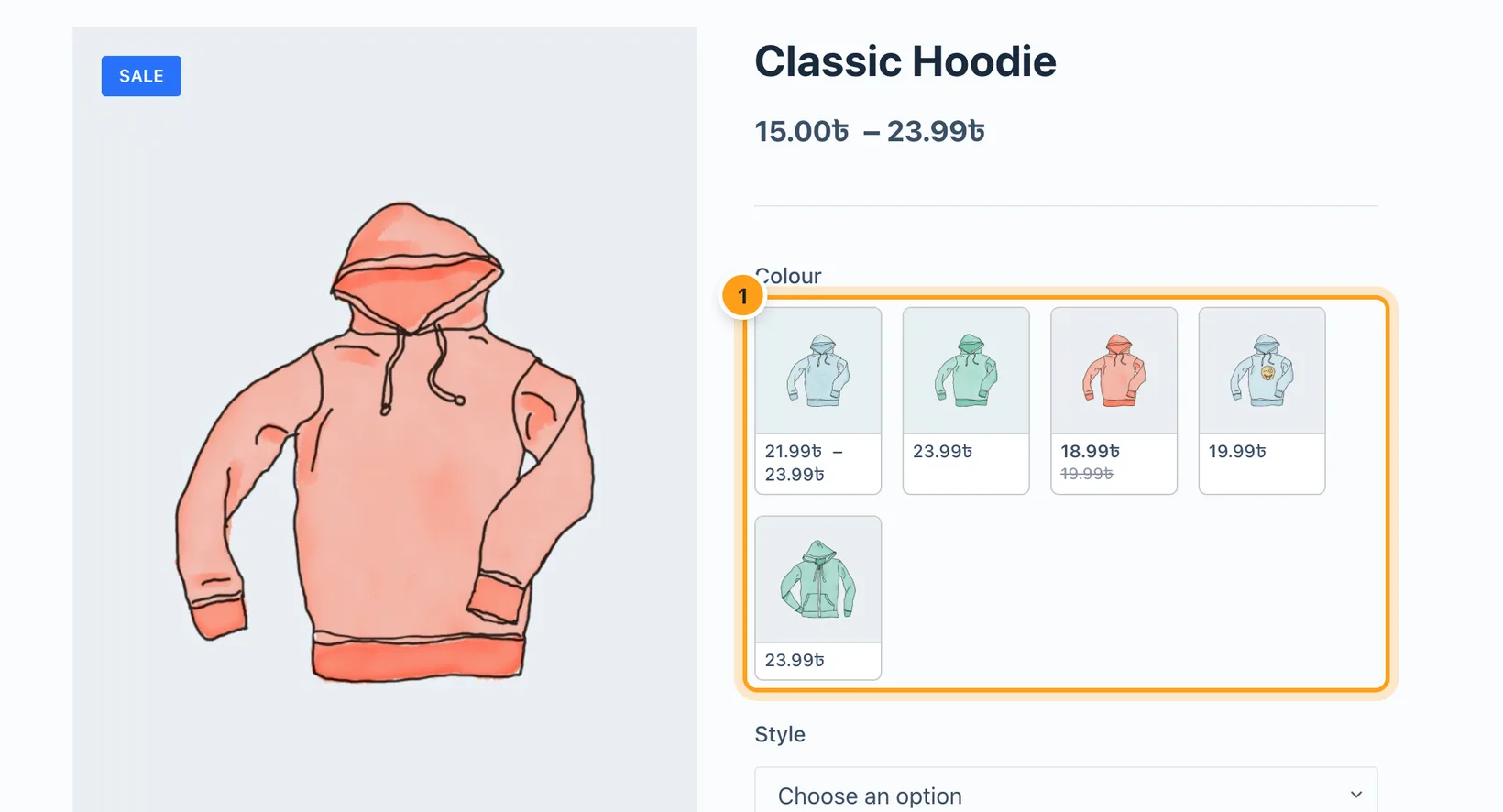
The only plugin here with no Pro version at all. It adds tile swatches that show each option’s own photo with its price underneath, the way Amazon does, and puts swatches on shop cards with add to cart. Sold-out options stay marked on products with more than 30 variations, without raising WooCommerce’s limit.
Free
- Colour, image, button and tile (photo and price) swatches
- Swatches on shop, category, tag and search pages, with add to cart from the card
- Card photo and price follow the chosen option
- Out-of-stock options crossed out, blurred or hidden, past 30 variations too
- Swatches for custom attributes made inside a product
- Colour filled in from the term name; image swatches fall back to variation photos
- Hover a tile to preview it in the main product image
Pro only
Nothing. There is no Pro version.
Watch out: Classic themes only. It is the newest plugin on this list, so it has the fewest reviews so far.
Download free on WordPress.org ↗ · More about KABAA Swatches →
2. Variation Swatches for WooCommerce by GetWooPlugins (Emran Ahmed)
Best for: The most popular choice, if you will pay for Pro
The most installed swatch plugin on WordPress.org and a safe, well-supported default. The free version covers the product page well; shop page swatches, custom attribute swatches and out-of-stock marking past 30 variations need Pro.
Free
- Colour, image and button swatches
- Image swatches made from variation images
- Colour matched from the term name
- Tooltips and the selected option’s name beside the label
- Out-of-stock cross, blur or hide (up to 30 variations)
- Quick View, Elementor, Dokan, WPML and RTL support
Pro only
- Swatches on shop and archive pages
- Swatches for custom attributes made inside a product
- Out-of-stock handling past 30 variations
- Gallery change when one attribute is chosen
- Per-product settings, dual colours, filter widget swatches
Watch out: Free swatches work on global attributes only.
3. Variation Swatches for WooCommerce by CartFlows (Brainstorm Force)
Best for: Free shop page swatches from a big vendor
Completely free, with no Pro version, from the team behind CartFlows and Astra. It is one of the few free plugins with swatches on shop pages, and it can build image swatches from variation images.
Free
- Colour (including dual colour), image and label swatches
- Dropdowns converted automatically
- Swatches on shop, category and archive pages
- Variation images used as image swatches
- Tooltips with name, thumbnail or both
- Out-of-stock blur, cross or hide
- WPML and Polylang
Pro only
Nothing. There is no Pro version.
Watch out: For products past 30 variations it raises WooCommerce’s limit (to 200, per its changelog), which makes those product pages heavier. Add to cart from the shop page is not listed.
4. WCBoost – Variation Swatches by WCBoost
Best for: A lightweight product-page plugin with developer hooks
A lean, well-built plugin for the product page, with per-product style overrides and developer hooks in the free version. Everything on the shop page is Pro.
Free
- Colour, image, label and button swatches
- Dropdowns converted to buttons automatically
- Shape, size, border and spacing controls
- Per-product style overrides
- Unavailable swatches hidden or blurred
- Multilingual, RTL, import and export
Pro only
- Swatches on shop and catalog pages
- Buying variable products from the shop page
- Image swatches made from variation images
- Dual and multi colour swatches
Watch out: Image swatches need an image uploaded per term in the free version.
5. Product Variation Swatches by ThemeHigh
Best for: The most out-of-stock display options for free
Highly rated, with radio swatches and strong out-of-stock options in the free version, plus a setting for WooCommerce’s 30-variation limit. Shop page swatches and image-with-label swatches are Pro.
Free
- Colour, image, label and radio swatches
- Out-of-stock hide, blur or strike through
- A setting for the AJAX variation threshold
- Click to deselect, lazy loading, tooltips
Pro only
- Swatches on shop and archive pages
- Image with label swatches
- More shapes, designs and tooltip types
- Stock left alerts, variation links, swatches in cart
Watch out: The threshold setting handles big products by raising WooCommerce’s limit, with the same page-weight cost.
6. Variation Swatches for WooCommerce by RadiusTheme
Best for: Themes that use Quick View, and multisite
A solid product-page plugin that works in Quick View and on multisite. Shop page swatches, add to cart from the shop page and custom attributes are Pro.
Free
- Colour, image, label and radio swatches
- Dropdowns converted to buttons automatically
- Product page and Quick View
- Out-of-stock cross, blur or hide
- Caching and multisite support
Pro only
- Swatches on shop, category and tag pages
- Add to cart from the shop page
- Swatches for custom attributes
- Swatch groups, dual colours, per-product overrides
Watch out: Most of what shoppers see outside the product page is Pro.
7. Product Variations Swatches by VillaTheme
Best for: Detailed swatch styling with saved profiles
The most styling control in a free version, through reusable swatch profiles. Out-of-stock marking and shop page swatches are both Pro.
Free
- Button, colour, image, variation image and radio types
- Swatch profiles for size, spacing, font, colours and shadow
- Hover and selected styles, tooltip styling
- Horizontal or vertical layout
Pro only
- Out-of-stock blur, strike through or hide
- Swatches on product lists and shop pages
- Add to cart from the shop page
- Change the product image per term, WPML
Watch out: Without Pro, sold-out options are not marked.
8. Swatchly by HasThemes
Best for: Free shop page swatches with shareable variation links
Generous free version: shop page swatches with positioning, per-product overrides, shareable variation URLs and a threshold setting are all free.
Free
- Colour, image, label and multi-colour swatches
- Shop and archive swatches with positioning
- Per-product overrides, text and image tooltips
- Shareable variation URLs, shortcode, import and export
- A setting for the AJAX variation threshold
Pro only
- Hiding out-of-stock options
- Image swatches made from variation images
- Radio swatches, AJAX add to cart, catalog mode
Watch out: Out-of-stock hiding is Pro.
9. Smart Swatches by ShapedPlugin
Best for: Free buy-from-the-shop-page and catalog mode
Free shop page swatches with buying from the shop page, Quick View and catalog mode. More out-of-stock styles and the threshold setting are Pro.
Free
- Colour, image and button swatches
- Shop, category and archive swatches with their own styles
- Buy from the shop page, catalog mode, Quick View
- Gallery update on selection
- Out-of-stock cross or blur
Pro only
- Image with text and radio swatches
- More out-of-stock styles and stock quantity
- The AJAX variation threshold setting
- Filter widgets and shareable links
Watch out: Big products past 30 variations need Pro.
10. YaySwatches by YayCommerce
Best for: Dual-colour swatches with zoom preview
A tidy plugin with dual-colour swatches, variation image swatches and a zoom preview in the free version. Out-of-stock marking and shop page swatches are Pro.
Free
- Colour, image, label and dual-colour swatches
- Image swatches made from variation images
- Hover tooltip and zoom preview
- WPML and Polylang
Pro only
- Out-of-stock greyed out, crossed or hidden
- Swatches on shop and catalog pages
- Custom product attributes, shortcodes
Watch out: Without Pro, sold-out options are not marked.
How to choose a variation swatches plugin
- Do you need swatches on the shop page? Most shoppers decide on the shop grid. If you do, start from the plugins that include it free: KABAA Swatches, CartFlows, Swatchly and Smart Swatches.
- How many variations does your biggest product have? Colours × sizes × styles. Past 30, check how the plugin marks sold-out options, as this guide to the 30-variation limit explains.
- Do your options cost different amounts? Then a price under each option saves shoppers a guess. See Amazon-style swatches with photo and price.
- Are your variation photos already uploaded? Pick a plugin that builds image swatches from them, so you don’t upload every image twice.
- Which theme do you use? Most swatch plugins, including KABAA Swatches, need a classic theme that uses WooCommerce’s standard variation form. Test on a staging copy first.
Frequently asked questions
What is the best variation swatches plugin for WooCommerce?
For most stores, the best one is the plugin whose free version covers your shop pages and out-of-stock options. KABAA Swatches includes everything free with no Pro version. GetWooPlugins’ Variation Swatches for WooCommerce is the most popular, with shop page swatches in Pro. CartFlows’ plugin is a fully free alternative.
Is there a free WooCommerce variation swatches plugin?
Yes, most have a free version. KABAA Swatches and CartFlows’ Variation Swatches for WooCommerce are free with no Pro version. Swatchly and Smart Swatches include shop page swatches in their free versions. Check what is free before installing, because shop page swatches and out-of-stock marking are often Pro.
Which swatch plugins show swatches on the shop page for free?
From their WordPress.org listings: KABAA Swatches, CartFlows’ Variation Swatches for WooCommerce, Swatchly and Smart Swatches. In GetWooPlugins, WCBoost, ThemeHigh, RadiusTheme, VillaTheme and YaySwatches, shop page swatches are Pro.
Can a swatch plugin show the price under each option?
Rarely. None of the other plugins here lists a price per swatch. KABAA Swatches’ tile swatches show each option’s photo with its price underneath, and the price narrows as other options are chosen.
Do swatch plugins work with more than 30 variations?
Above 30 variations WooCommerce stops sending variation data to the page, so many plugins stop marking out-of-stock options there. Some offer a setting that raises the limit, which makes pages heavier. GetWooPlugins handles it in Pro. KABAA Swatches handles it free without raising the limit.
Will a variation swatches plugin slow down my store?
A well-built one should not. Look for a plugin that loads its scripts only on pages with swatches and does not add a database query per variation. Test your largest product page before and after installing.
Maintain one of these plugins and something changed? Tell me through the contact page and I will update it.